Run your trade business from home or a van? You can set up a Google Business Profile without displaying your home address to customers. The key is to use your real business base when Google requests it and keep your public address hidden.
If you have not created a profile yet, start with our guide to setting up a Google Business Profile. Already have one? Getting your location details right supports your wider efforts to rank in the Google Map Pack.
This guide explains which address to use, how to hide it and how to prepare for verification.
Get in touch if you need help with this!
What Is a Service Area Business?
A service area business visits or delivers to customers but does not serve them at its own address. Plumbers, electricians, cleaners and mobile mechanics often fit this category.
If customers visit your premises and you also travel to them, you run a hybrid business. You can display an address if the premises meet Google’s requirements, including permanent signage and staff who receive customers during your stated hours. Google Business Profile Help.
Does Google Need Your Home Address?
Google may ask for your real business address during verification, even when customers never visit you. If you genuinely run the business from home, use that address when requested.
However, you should keep it hidden from your public profile. Customers will see your service area instead. You do not need to display your home address to use Google Business Profile. Google Business Profile Help
Which Address Can You Use?
Use the location where you genuinely operate your business. That could be your home, workshop or another eligible business base.
Avoid these options:
- Virtual mailing addresses: Renting an address without operating there does not make it eligible.
- PO boxes and remote mailboxes: Google does not accept them as business locations.
- Borrowed premises: Do not use a friend’s address simply to appear closer to customers.
- Co-working offices that fail Google’s requirements: These need clear signage, your own staff during business hours and the ability to receive customers.
Also, use your real business name. Adding extra services or town names solely to target searches can breach Google’s rules. Google Business Profile Help
How to Set Up a New Profile
When Google asks whether customers can visit your business location, choose No if you only travel to them.
Next, enter the areas you serve. If Google requests an address for verification, provide your real business base and follow the instructions shown.
Google chooses the verification methods available to your business. Your options may differ from those another business receives. Google Business Profile Help
How to Hide an Address on an Existing Profile
If your profile currently displays an address where you do not receive customers, hide it:
- Sign in to the Google Account that manages your profile.
- Find your business on Google Search or Maps.
- Select Edit profile, then Location.
- Open Business location.
- Turn off Show business address to customers.
- Select Save.
If Google asks you to correct or confirm your address, use your genuine business location. Check the public listing afterwards to confirm that it no longer displays your address. Google Business Profile Help
How to Add Your Service Areas
Your service areas tell customers where you work. To update them:
- Open Edit profile, then Location.
- Select the edit option beside Service area.
- Add the towns, cities or postcode areas you serve.
- Remove any places you no longer cover.
- Select Save.
Google allows up to 20 service areas. You must select named areas rather than draw a radius.
As a general guideline, your overall coverage should stay within about two hours’ driving time of your base. Google allows larger areas for some businesses. Choose locations you genuinely serve, such as Bournemouth, Poole and Christchurch. Google Business Profile Help
How to Prepare for Video Verification
Google may ask you to verify again after you change business details. If it offers video verification, plan what you will show before starting. Google Business Profile Help.

For a service area business, cover three things:
- Your location: Show nearby street signs, landmarks or building numbers.
- Your business: Show the tools, equipment, products or workspace you use.
- Your authority to manage it: Show access to business assets or suitable documents that match your business name.
Record through your Business Profile on a mobile device. Google requires one continuous, unedited recording lasting at least 1 min 30 seconds. You cannot film it offline and upload it later.
If you need help with this give us a call!
Keep sensitive information and other people’s faces out of the video. A branded van can help demonstrate your business, but Google also accepts other evidence, such as professional equipment and business documents.
Google says video reviews can take up to five business days. If it rejects your recording, check Review issues and include the missing evidence in your next attempt. Google Business Profile Help
Keep Your Business Details Accurate
Check your business name and contact details across your profile, website and directory listings. Correct old phone numbers and outdated location information.
Our guide to NAP consistency explains how to keep your name, address and phone details organised. If you use a hidden home address, review public listings carefully rather than automatically publishing it everywhere.
Can You Rank Without Showing Your Address?
Yes. Service area businesses can appear in local search results without displaying an address.
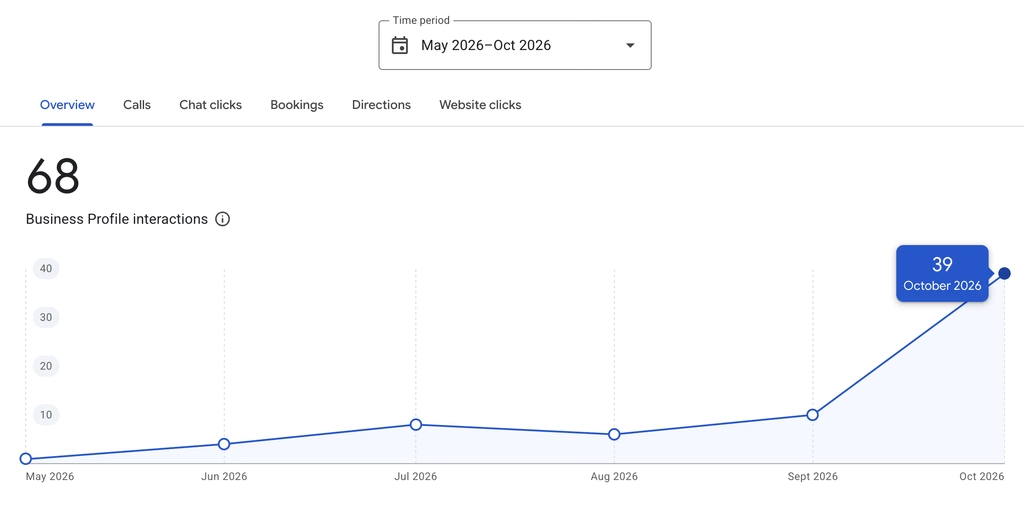
However, verification does not guarantee a place in the top three map results. Google considers relevance, distance and prominence when ranking local businesses. Accurate information and positive reviews can help, but no address setup guarantees a particular position. Google Business Profile Help
What If Google Rejects or Suspends Your Profile?
First, check the reason Google gives. A failed verification video and a suspended profile need different responses.
For a suspension, review the relevant policy, correct the problem and follow Google’s official appeals process. Prepare supporting documents before submitting your appeal.
If Google offers an evidence form, submit your evidence within its 60-minute window. Do not create another profile for the same business while the appeal is under review. Google Business Profile Help
Need Help With Your Google Business Profile?
Address settings and verification can take time away from running your business. At JNB Marketing, we help trades across Bournemouth, Poole and Dorset set up and manage their Google Business Profiles.
Explore our marketing support packages or get in touch to discuss your profile. You can also give us manager access while keeping ownership of your account.
Service Area Address FAQ
Will customers see my home address?
Google should not display it on your Business Profile when you turn off the address visibility setting. However, this does not remove it from other websites or directories. Google Business Profile Help
Should I add all 20 service areas?
Only if you genuinely serve them. Twenty is the maximum, not a target. Google Business Profile Help
Can I guarantee approval on the first attempt?
No. Google decides whether your evidence meets its requirements. Accurate details and clear evidence help you prepare, but they cannot guarantee approval. Google Business Profile Help